Post-session analysis · iPad & iPhone

GPS track analysis
for competitive sailors

VMGenie reads the GPS track from a Vakaros, or an Apple Watch running Waterspeed, and lays the session out on a map: allowing you to see speed and course over the ground, VMG, wind direction inferred from your own sailing, with every tack and gybe measured precisely. It's designed for sailors of dinghies and small keelboats who wish to improve their racing performance, with the Olympic classes set up out of the box.

Why VMGenie

You can't improve what you don't measure

A raw GPS track looks like little more than course and speed, but VMGenie derives what's hidden in it: your VMG, the wind direction you were sailing to, and, where a Vakaros adds magnetic heading, the set and rate of the current beneath you. These help to answer the key performance questions in any small boat: for a given wind and sea state, what angles should I sail upwind or downwind for best VMG, and how should these angles vary if I am lifted or headed? How should I execute my tacks, gybes and mark roundings most efficiently in different sailing conditions?

See it in action

A worked example

The screens below are from one Waterspeed session, imported and analysed.

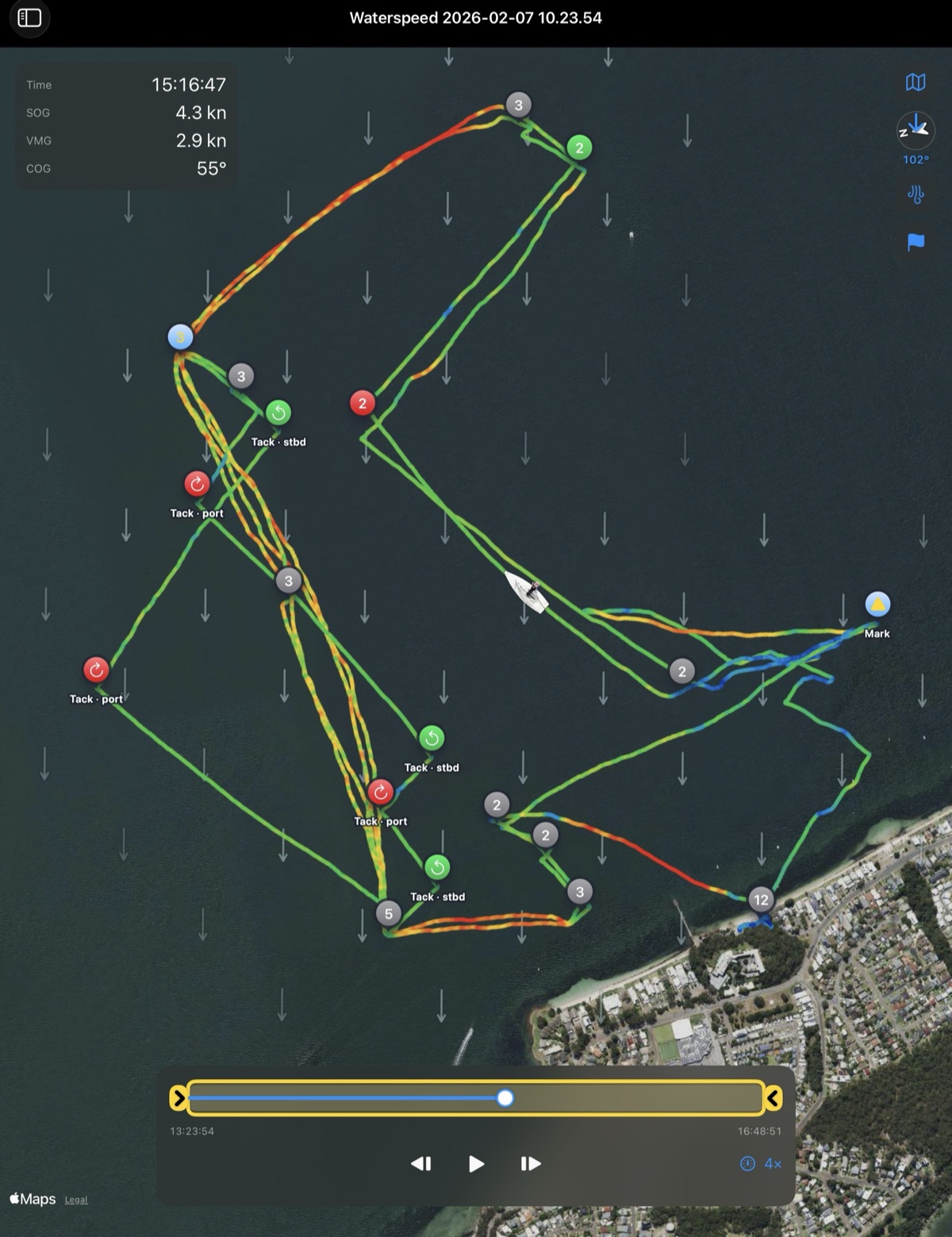
VMGenie showing a full session over satellite imagery: the track coloured by speed with tacks labelled port and starboard, marks, starts and finish flagged, wind arrows across the course, and SOG, VMG and COG read out in the corner.

The complete session, with manoeuvres automatically classified

Import the track and VMGenie lays out the entire session — every leg coloured by speed, with tacks, gybes, marks, starts and finishes found and labelled automatically. Tap anywhere for the SOG, VMG and COG at that instant, with the wind drawn across the course.

One race replayed

A complete race replayed at 120×: the boat runs along its speed-coloured track over the satellite base, with wind arrows across the course and the time, SOG, VMG and COG reading out as it goes. If you look closely you will notice the wind direction arrows shifting slightly during the race.

Select a section of the track, read the averages

Drag out any part of the track — a beat, a run, a single leg between two marks — and get its average speed over the ground (SOG), velocity made good (VMG) and course over the ground (COG). If you have data from a Vakaros, you will also have magnetic heading, and this, combined with SOG and COG, allows VMGenie to derive current speed and direction when the wind is sufficiently steady.

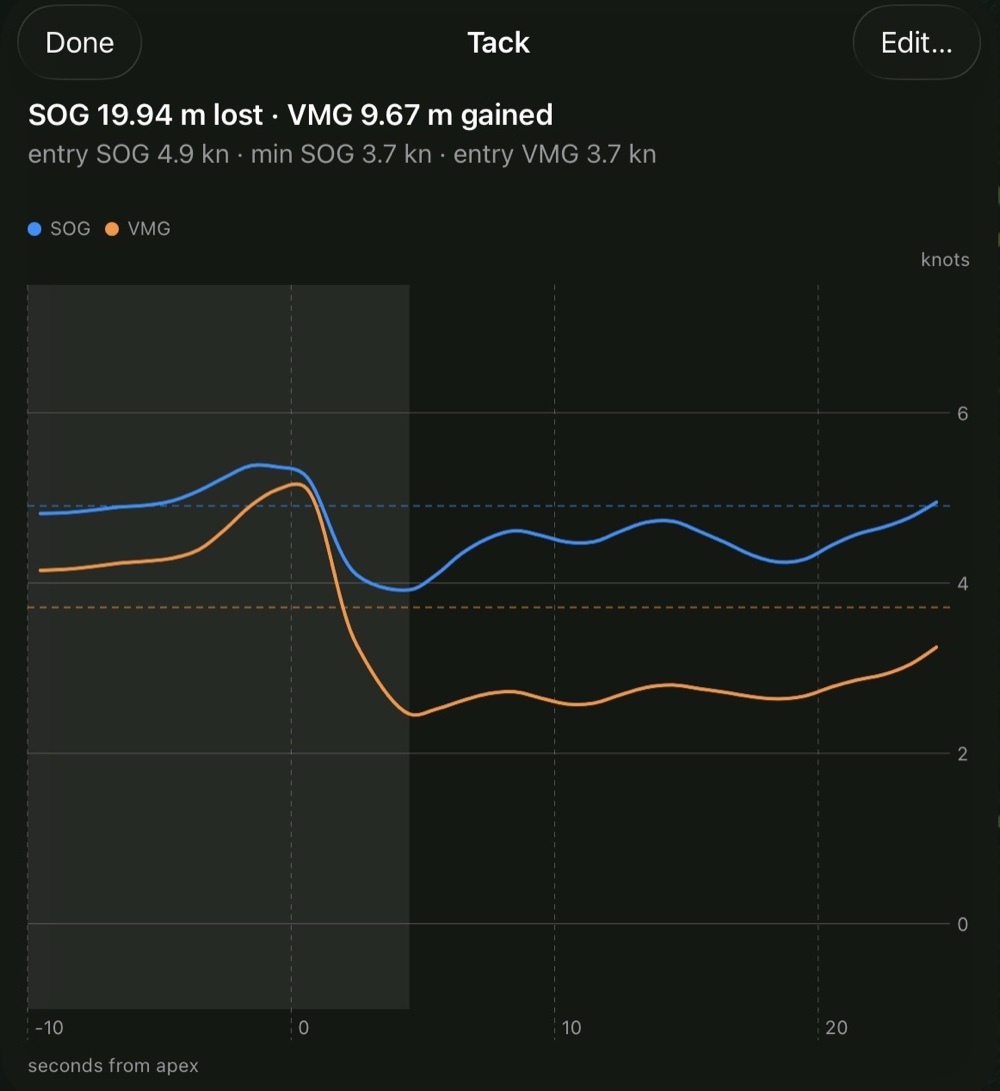
A tack analysis chart: boat speed and VMG plotted second by second through the turn, with the metres lost and gained headlined.

Drill down on every tack and gybe

Open a manoeuvre to see boat speed and VMG through the turn, second by second either side of the apex. It reports the metres lost — or, on a favourable shift or tide, the metres gained.

Features

What's in the app today

Your track on the map

The whole session drawn as a speed-coloured line over Apple Maps or satellite imagery. Zoom, pan and rotate — north-up or aligned to the wind.

Inspect any point

Tap the track or scrub the timeline for the time, SOG, VMG, COG, heading and heel at that moment. Select a stretch and get its averages instead.

Scrub & replay

A timeline scrubber with a boat that moves along your track as it plays. Play back at 1× to 120×, step frame by frame, and crop to just the part that matters.

Every tack & gybe, costed

Manoeuvres are found automatically and marked on the map. Tap one for a speed-and-VMG chart through the turn and the metres you lost — or gained.

Wind from your sailing

VMGenie reads the wind direction from your own upwind work and draws it on the map — or cross-checks it against a historical weather archive. Set it by hand any time.

Current, estimated

By comparing your speed, magnetic heading and course over the ground on opposite tacks, VMGenie estimates the tidal set across the course and shows it as arrows — no station tables to enter.

Tuned to your class

Detection thresholds and the on-screen boat are set per class — ILCA, 470, 49er, Nacra 17, iQFoil, Formula Kite — so a foiler's speeds aren't mistaken for noise.

Correct it yourself

Disagree with a detected tack, or want to add one it missed? Adjust or add manoeuvres by hand — your corrections are saved with the session and sync across devices.
Class presets

Detection tuned to each class

Outlier gates, tack and gybe thresholds and manoeuvre windows are set per class — so a 35-knot kite spike isn't discarded as noise, and a deep-running gybe isn't missed. Override anything per session.

  • ILCA
  • 470
  • 49er
  • Nacra 17
  • iQFoil
  • Formula Kite
  • + customisable settings for your favourite dinghy or small keelboat class

How it works

From file to analysis, in three steps

  1. 1

    Import your track

    Open a Vakaros Atlas 2 .vkx, or a GPX / CSV export from Waterspeed or Vakaros Connect. Duplicate-safe, with progress and a clear warning if any rows can't be read.

  2. 2

    Set it up

    Pick your boat class and let VMGenie infer the wind direction and current from your sailing — or set the wind yourself. Crop the track down to the legs you want to study.

  3. 3

    Work through it

    Scrub and replay the session, open each tack or gybe to see what it cost, and read the speed and VMG at any point. Change the wind and every figure recomputes.

iCloud sync

Your sessions, on all your devices

Import a track on one device and it's there on the others. VMGenie keeps your tracks and settings in your own iCloud, in sync across your iPhone and iPad — with no separate account to create — and everything still works offline when you're away from a signal.

  • In sync, automatically. Your whole library follows you from device to device — nothing to set up.
  • Works offline. Everything runs on-device; away from a signal, nothing stops working.

Still in development

VMGenie is in active development, heading for a TestFlight beta on iPhone, iPad and recent Macs. Leave your email and I'll keep you posted.

Requires an iPhone or iPad on iOS 18+, or a Mac with Apple silicon.

About the author

Dr Andrew Mason

Naval architect · machine-learning engineer · sailor

VMGenie has been built by Dr Andrew Mason, who has spent his career at the intersection of boat design, data science and sailing performance. He is the original author of Maxsurf — the naval-architecture software used to design marine vessels the world over — which he created and led at FormSys for more than two decades.

He applied machine learning to hull-shape optimisation for two winning America's Cup campaigns — Alinghi (2007) and Oracle Team USA, whose USA 17 took the 2013 Cup — work underpinned by his PhD, Stochastic Optimisation of America's Cup Class Yachts. He later spent five years as a machine-learning researcher at Apple, working on virtual reality for the Apple Vision Pro project.

On the water

Andrew has been racing small boats since he was twelve, when he started out in the Cherub class, and went on through Lightweight Sharpies and Fireballs, with Olympic campaigns in the 470 and Flying Dutchman. He spent five years in the Laser — now the Olympic ILCA 7 — racing in State, National and Pacific championships as well as in multiple European, Dutch Open, North American and World Championships. In 1980 he took up windsurf speedsailing, competing at five consecutive Weymouth Speed Weeks and holding national speed records several times over. He still races the ILCA 7 in the Great Grand Master division, and wingfoils for the fun of it.